


A business continuity plan format has ten sections: plan control, scope, roles, business impact analysis, continuity strategies, an IT recovery reference, activation steps, contact lists, communications, and a testing and revision log. Build it in five steps, starting with the owner and the impact analysis. You end up with a plan of 10 to 20 pages that your team can use during an outage, not a 60-page binder nobody opens. This guide gives you the format, the worksheet layout, and a sample for a small business.
Most small businesses stall at the blank page. Free templates often run to dozens of pages written for large organizations, ask for details you do not have, and get abandoned half filled. Others are copied word for word, so the plan describes a warehouse you do not own and recovery targets nobody agreed. Then the finished document sits on the file server or one laptop, which is unreachable in the outage it was written for.
This article walks through the format section by section and shows how to fill each one. You get a skeleton to copy into Word, an Excel layout for the impact analysis, a sample plan for a fictional 25-person business, and a test schedule. RKCO East Africa Consulting helps organizations in Kenya, Uganda, and Tanzania with business continuity management, including disaster recovery, so the examples reflect conditions East African teams plan for, such as power cuts, flooding, and dependence on mobile money.
What a business continuity plan template contains
A business continuity plan template is a fixed set of sections with prompts that guide you through writing how your organization keeps critical work running during a disruption. The standard format has ten sections, and a small business can fit all of them into 10 to 20 pages.
The ten sections in order
The table shows each section, the question it answers, and the step in this guide where you build it.
| # | Section | What it answers | Built in |
|---|---|---|---|
| 1 | Plan control | Who owns this version, who approved it, when it is reviewed | Step 1 |
| 2 | Scope and assumptions | Which sites, processes and events the plan covers | Step 1 |
| 3 | Roles and succession | Who decides, who speaks, who deputizes | Step 1 |
| 4 | Business impact analysis | Which processes matter most and how long each can be down | Step 2 |
| 5 | Continuity strategies and workarounds | How each critical process keeps running | Step 3 |
| 6 | IT recovery reference | Where the IT recovery plan lives and what is restored first | Step 3 |
| 7 | Activation and first hour | When the plan starts and what happens first | Step 4 |
| 8 | Contact lists | Who to call, on which numbers | Step 4 |
| 9 | Communications plan | Who tells staff, customers and others what, and when | Step 4 |
| 10 | Testing, training and revision log | Proof the plan works and a record of changes | Step 5 |
A usable plan is ten short sections that people can act on, not a binder that sits on a shelf.
Some organizations call the full set a business continuity management plan template. The difference is scope. Business continuity management is the ongoing program of policy, analysis, planning, and exercises, described in the international standard ISO 22301. The plan is the document people open during an incident. Small organizations need the plan first, and can adopt the full management system later if a regulator, customer, or tender asks for it.
Which file format to use
Use Word for the narrative sections and Excel for the tables. Sections 1 to 3, 5 to 7, and 9 read well as text. The impact analysis, contact list, and exercise log work better in a spreadsheet, where you can sort by downtime tolerance or filter by owner.
A simple business continuity plan template is therefore one Word file plus one Excel workbook, both with version numbers. Export a PDF only after approval, for printing and distribution, and keep the editable source. Whatever format you choose, make sure a copy exists outside your own servers.
A skeleton to copy into your first draft
Paste this into a new Word document and replace each bracket. Delete any prompt that does not apply to your business, but keep all ten headings so the plan stays in the standard order.
BUSINESS CONTINUITY PLAN
1. PLAN CONTROL
Company: [name] | Version: [1.0] | Date: 2026
Plan owner: [name, title] | Approved by: [name] on 2026
Next review: 2026 | Copies held by: [names]

2. SCOPE AND ASSUMPTIONS
Sites: [ ] | Critical processes: [ ]
Events covered: [loss of building, systems, people, supplier]
Assumptions: [e.g. mobile networks work, staff have home internet]

3. ROLES AND SUCCESSION
Activates the plan: [name] | Deputy: [name]
Approves emergency spending: [name] | Deputy: [name]
Speaks for the company: [name] | Deputy: [name]

4. BUSINESS IMPACT ANALYSIS
[Process] | Owner | MTD | RTO | RPO | Minimum staff | Workaround

5. CONTINUITY STRATEGIES AND WORKAROUNDS
[Process]: alternate place / people / supplies / manual method / days it can last

6. IT RECOVERY REFERENCE
IT recovery plan location: [ ] | Restore order: 1 [ ] 2 [ ] 3 [ ]
IT emergency contact: [name, number]

7. ACTIVATION AND FIRST HOUR
Trigger: [e.g. office unusable or order system down for over 2 hours]
First-hour checklist: [ ]

8. CONTACT LISTS
Staff, customers, suppliers, insurer, landlord, utilities, IT provider,
emergency services: name | role | two phone numbers

9. COMMUNICATIONS PLAN
Audience | Contact person | Channel | Timing | Where the message is stored

10. TESTING, TRAINING AND REVISION LOG
Exercise | Date | Owner | Gaps found | Fixed by
Date | Change made | Changed by | Approved by
What to prepare before you start
Block two to three hours with your leadership team and gather the inputs below first. A plan written from memory in one sitting always misses a supplier or a system that someone remembers later.
- A list of your main processes, each with the person who runs it
- Current staff phone numbers, including a personal number
- Your top customers, suppliers, and service providers, with emergency contacts
- Your IT provider’s details and a list of your systems
- Your insurance policy numbers and the claims contact
- Your lease or landlord contact, and utility account numbers
Step 1. Set scope, owner, and roles
Name one plan owner, write down what the plan covers, and give every key decision a named person and a deputy. This fills the first three sections of the format and takes about an hour with your leadership team.
Name the owner and get approval
Pick an owner with authority over staff and budget, such as the managing director or head of operations. IT should contribute, but IT should not own the plan, because most disruptions that stop a small business are not technical. Record the version, approver, and review date in section 1 so that anyone holding a printed copy knows whether it is current.
Define what the plan covers
Limit the first version to the five to eight processes that would cost you money, customers, or a legal deadline within a few days. Then plan around four kinds of loss instead of dozens of causes: you lose the building, the systems, the people, or a key supplier. Typical triggers for each:
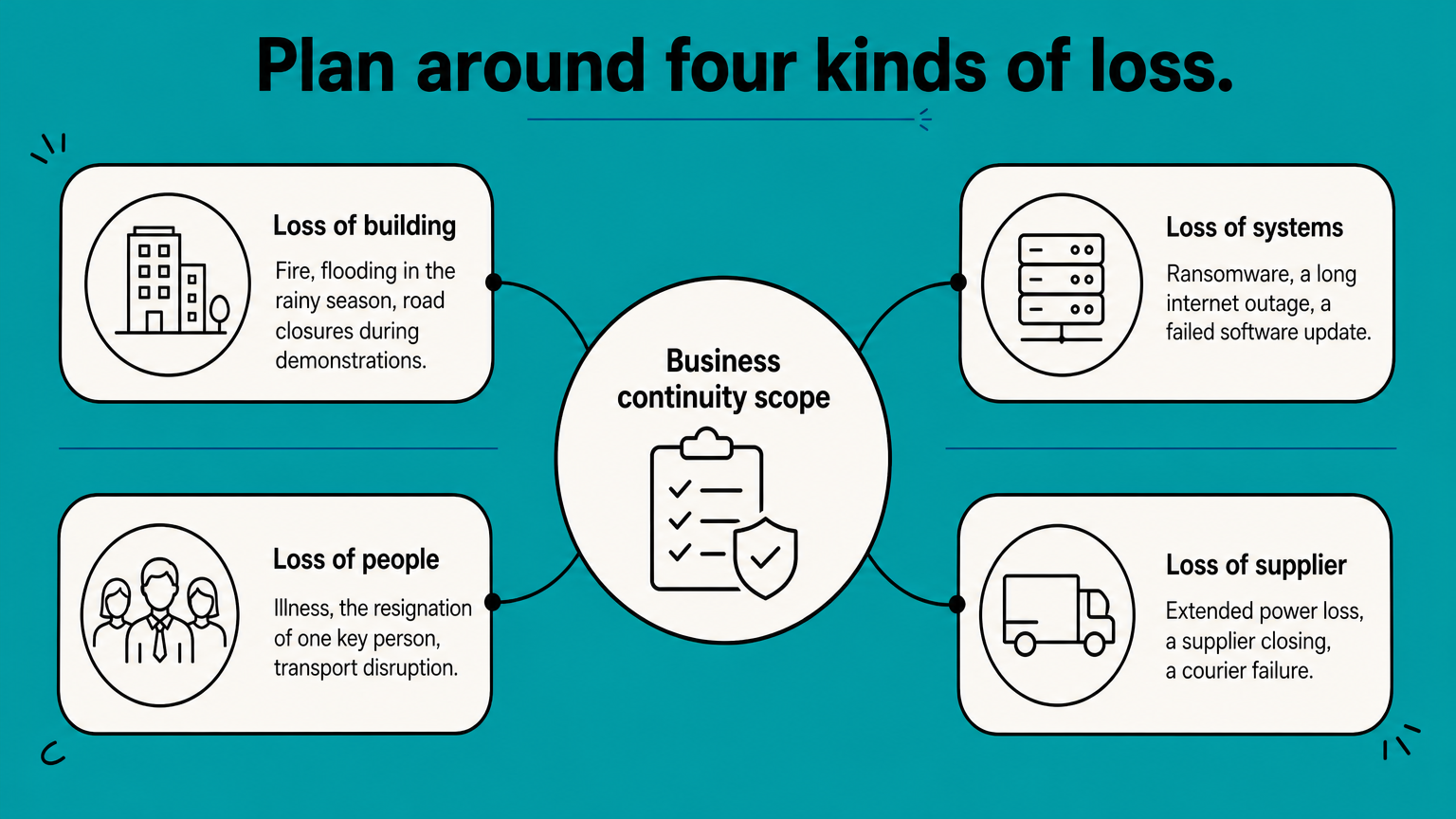
- Building: fire, flooding in the rainy season, road closures during demonstrations
- Systems: ransomware, a long internet outage, a failed software update
- People: illness, the resignation of one key person, transport disruption
- Supplier or utility: extended power loss, a supplier closing, a courier failure
Write your assumptions next to the scope, such as "mobile networks work" or "staff can reach home internet". When an assumption fails, the plan needs revising.
Assign roles and deputies
Every role needs a deputy, because the person you name will sometimes be on leave or unreachable. A small business needs five roles:
- Activator, who declares an incident and starts the plan
- Spending approver, who authorizes emergency purchases
- Spokesperson, who speaks to customers, media, and authorities
- Staff coordinator, who tells people where to work
- IT lead, who liaises with your technology provider
One person can hold two roles in a 20-person company, but never a role and its own deputy.
A plan with one name per role fails the first time that person cannot be reached.
Step 2. Run the business impact analysis
List each process, ask the person who runs it what breaks when it stops, and agree with leadership how long each one can stay down. The result fills section 4 and decides everything that follows, because it tells you where your effort goes.
Fill in the worksheet
Build this as an Excel sheet with one row per process. Interview the person who does the work, not only the IT provider, since they know the peak periods and the manual workarounds. The Ready.gov guidance on business impact analysis lists the impacts worth weighing, such as lost sales, extra expenses, fines, contractual penalties, and unhappy customers.
| Column | What to enter | Sample entry |
|---|---|---|
| Process and owner | The activity and the accountable person | Taking customer orders; sales manager |
| Peak period | When an outage hurts most | Monday mornings, month end |
| Impact over time | Effect after 4 hours, 1 day, 3 days, 1 week | 1 day: orders go to competitors |
| MTD | Maximum tolerable downtime, agreed by leadership | 1 business day |
| RTO and RPO | Per system the process needs | Order system: 4 hours and 1 hour |
| People | Minimum staff and who can cover | Two order takers, one cross-trained clerk |
| Systems and data | Applications, files, devices | Order system, phones, price list |
| Suppliers | Outside services relied on | Internet provider, phone provider |
| Workaround | Manual method and how long it works | Paper order forms, workable for 2 days |
Set MTD, RTO, and RPO
Three terms keep the numbers honest. MTD is the total time leadership will accept a process being down. RTO, the recovery time objective, is how long a system can be unavailable, and it must be shorter than the MTD because you still need time to catch up afterward. RPO, the recovery point objective, is how much recent data you can afford to lose, which sets how often you back up.
Then sort the rows into tiers: Tier 1 for processes with an MTD up to 24 hours, Tier 2 for one to three days, and Tier 3 for anything longer. Tier 1 gets restored and staffed first.
A worked example
Say order taking brings in about KES 500,000 a day. Two days of downtime puts up to KES 1,000,000 of sales at risk, before overtime to catch up. Leadership decides one business day is the most it will accept, so the MTD is 24 hours. The order system gets an RTO of 4 hours, which leaves time to re-enter paper orders, and an RPO of 1 hour, which means backups at least hourly. These figures are illustrative. Your own owners must agree yours.
Downtime targets are a leadership decision, so write down what you will accept before deciding what to buy.
Step 3. Write strategies and workarounds
For each critical process, write one way to keep it running without its usual building, systems, people, or supplier, and state how many days that fallback can last. This fills section 5 of the business continuity plan format, and section 6 points to your IT recovery plan.
Match a strategy to each loss
Choose the cheapest option that meets the MTD from step 2. Remote work costs little, while a second site is rarely justified for a small firm.
| If you lose | Typical strategy | Example |
|---|---|---|
| The building | Remote work or a borrowed space | Office staff work from home on company laptops |
| Systems | Manual forms and offsite backups | Printed order forms, cloud backup, a mobile hotspot |
| People | Cross-training and written procedures | Two staff trained on each warehouse role |
| A supplier | A second approved supplier or buffer stock | Two weeks of fast-moving stock held |
| Power | Backup power for critical equipment | UPS for servers, a generator or inverter for the office |
A sample plan for a small business
This is an illustrative example for a fictional 25-person distribution business with one office and one warehouse. Every target is a placeholder for numbers your own owners agree.
| Critical process | Owner | MTD | Continuity strategy | Manual workaround |
|---|---|---|---|---|
| Customer orders | Sales manager | 1 business day | Order takers work from home, calls forwarded | Paper order forms, printed price list |
| Customer phones | Office manager | 4 hours | Main number forwarded to mobile phones | Callback list kept on paper |
| Picking and shipping | Warehouse lead | 2 business days | Second transporter on call, two staff per role | Pick lists printed from the last daily stock export |
| Customer payments | Finance officer | 1 business day | Mobile money and bank statements downloaded from provider portals | Manual receipts log, reconciled later |
| Invoicing and collections | Finance officer | 5 business days | Accounting system reachable from any laptop | Invoices issued late from delivery notes |
| Payroll | Finance officer | Until payday | Bank portal access held by two authorized people | Repeat last month’s payroll, adjust next cycle |
Point to the IT recovery plan
Section 6 should not repeat technical detail. It states where the IT recovery plan is stored, the order in which systems return, and who the IT contact is. The restore order follows your tiers, so in the sample above the order system comes back before the accounting system. Keep the two documents referencing each other, so a change in one prompts a check of the other.
Step 4. Document activation and communications
Write down when the plan starts, what the first hour looks like, and who tells whom what, on one page each. This fills sections 7 to 9, the parts people read under pressure, so keep them short.
Set the trigger and first-hour checklist
Choose a trigger that anyone can judge, for example "the office is unusable, or the order system is down for more than two hours". Then list what happens in the first hour:
- The person who finds the problem calls the activator.
- The activator confirms the trigger and declares the plan active.
- The staff coordinator tells people where to work.
- The IT lead contacts the IT provider and reports what is down.
- The spokesperson sends the first customer message.
- Someone starts a dated log of decisions and spending.
Build the contact lists
Give each person or organization a name, role, and two phone numbers. Cover staff, key customers, suppliers, your insurer, the landlord, the electricity and internet providers, your IT provider, and emergency services. Refresh the list every quarter, and keep a printed copy with each manager. Because the list holds personal numbers, restrict access to the file and treat it as personal data.
Plan communications in advance
Decide the audiences, the sender, the channel, and the timing now, and write the first message for each while nobody is under pressure.
| Audience | Who contacts them | Channel | When |
|---|---|---|---|
| Staff | Staff coordinator | Group message from the printed list | Within 30 minutes |
| Customers with open orders | Sales manager | Phone, then prepared SMS or email | Same day |
| Suppliers and transporters | Warehouse lead | Phone | Same day |
| Insurer | Finance officer | Claims line | When damage is known |
| IT provider | IT lead | Emergency line | Immediately |
| Regulators and affected people | Owner, with advice | As the rule requires | When a law or contract requires notice |
In Kenya, the Data Protection Act, 2019 requires a data controller to notify the Data Commissioner within 72 hours of becoming aware of a breach that puts people’s rights at risk, so confirm the current rules with your legal adviser and put the deadline in the plan. Store a short customer message with the plan:
[Company name] update: Our [office/warehouse] is affected by [event].
We are still taking orders on [phone number] and [email].
Deliveries may be delayed by [timeframe].
Next update by [time] today. Contact: [name, number].
The first hour goes better when every message was written before the incident.
Step 5. Test, store, and maintain the plan
Exercise the plan before you rely on it, keep copies where an outage cannot block them, and review it every year and after any major change. This fills section 10, and it is what separates a good business continuity plan from a document that merely exists.
Run exercises on a schedule
An untested plan is a draft. Start with the cheap tests and add the harder ones as the plan matures.
| Exercise | What it proves | Frequency | Record to keep |
|---|---|---|---|
| Contact list check | Numbers and people are current | Quarterly | Date and corrections made |
| Notification drill | A message reaches everyone on the list | Twice a year | Minutes taken to reach all |
| Tabletop exercise | Roles and decisions hold up in a realistic scenario | Yearly, and after a real incident | Notes, gaps, owners, dates |
| Workaround test | A manual process or remote working day works | Yearly for each critical workaround | What worked and what failed |
| IT recovery test | Systems return within their RTO | At least yearly | Measured time against each RTO |
For a tabletop, gather the role holders for 60 to 90 minutes and give them a scenario, such as "the office is inaccessible from Monday morning for three days". Walk through the plan and note every question nobody can answer. Each gap gets an owner and a date.
Store copies where outages cannot block them
Keep a printed copy with each manager and at the place the team would gather. Keep an electronic copy in cloud storage outside your own server, and a copy on managers’ phones. A plan stored only on the file server is unavailable in the outage it was written for. Control access, because the plan holds personal numbers and account details.
Keep the plan current
Review the whole plan once a year, and also after an office move, a new system, a change of key staff, or a real incident. Log every change in the revision table with the date, the person, and the approver. Use this checklist to judge whether the plan is good:
- A new manager can read it in about 20 minutes.
- Every critical process has an owner, an MTD, and a workaround.
- Every role has a deputy.
- Contacts were verified in the last quarter.
- The plan was exercised in the last 12 months, and the gaps found were closed.
- Copies exist offline and outside your own servers.
A plan that has never been tested is a draft, so schedule the first exercise before you call it finished.
Your plan, one section at a time
You now have the whole format: ten sections, built in five steps. Settle the owner, scope, and roles. Run the impact analysis to set downtime targets. Write a workaround for each critical process. Document activation and communications. Test the plan, store copies offline, and review it every year. Start with the skeleton, fill the sections you can finish today, and let the exercises show you what is missing.
If you would rather not build it alone, RKCO East Africa Consulting works alongside your team on business continuity management, including disaster recovery. Talk to RKCO East Africa Consulting about your business continuity plan and bring your draft, even if it is only the skeleton above.
